AIDealsPro is reader-supported. Some links on this page are affiliate links: if you buy through them we may earn a commission at no extra cost to you. It never changes our verdicts. How we review: https://aidealspro.com/how-we-review/
Best for: marketers and social teams turning scripts into videos at volume — templates, stock, and AI voiceover in one workflow.
Not for: cinematic fine control, or anyone expecting film-grade text-to-video — output can look template-driven.
Starting price: $10/seat/month (Starter, billed annually — via official page reports, Oct 2026).
Table of Contents
What is InVideo AI?
InVideo is a prompt-to-video platform for marketing and social content: describe the video you want, and it assembles stock footage, AI-generated clips, captions, and AI voiceover into a finished piece. It includes a 16M+ stock media library, templates, AI voiceover in 50+ languages, and — on higher tiers — premium generative models (Sora 2, Veo 3.1). It is built for volume: ads, Reels, Shorts, and explainers produced quickly. This InVideo AI review covers the pricing, the free plan’s limits, and where it fits.
Pricing: what InVideo costs (via official page reports, Oct 2026)
Figures below are from the official pricing page via October 2026 reports, in USD. Confirm at checkout — InVideo adjusts tiers and limits periodically.
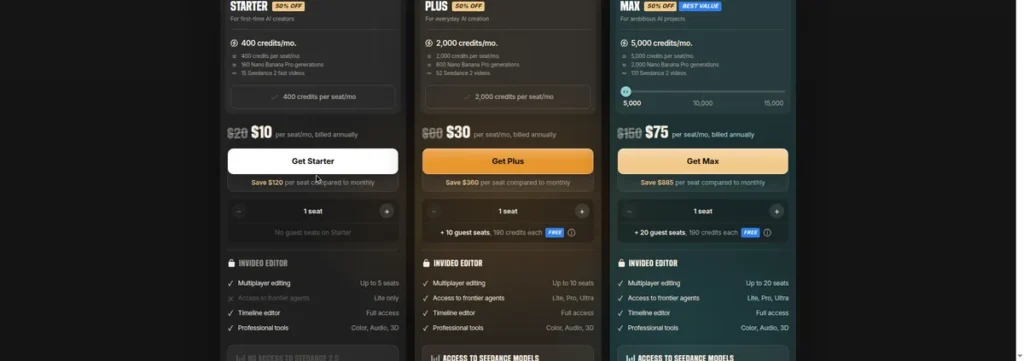
| Plan | Price | Key allowance | For |
|---|---|---|---|
| Free | $0 | Watermarked exports, limited AI minutes | Testing the workflow |
| Starter | $10/seat/month billed annually ($20 monthly) | 400 credits/seat/month, no watermark | Solo creators |
| Plus | $30/seat/month billed annually ($60 monthly) | 2,000 credits/seat/month, no watermark | Regular producers |
| Max | $75/seat/month billed annually ($150 monthly) | 5,000 credits/seat/month, no watermark | Teams, heavy volume |
Prices are per seat (solo creators buy 1 seat), with a 50% promo on annual billing. Credits don’t roll over. Prices in USD — confirm at checkout.
How the workflow actually works
The loop is: prompt → draft → edit → export. You write a text prompt describing the video (topic, length, style, voice). InVideo generates a draft from stock and AI clips with captions and voiceover. You then edit in a timeline-style editor: swap clips, change the script, pick a different voice, adjust captions. Finally export at your chosen resolution. The honest assessment: the first draft does 70% of the work; the edit pass is where quality comes from. Budget real editing time — prompt-to-video is not prompt-to-published.
What the free plan really gives you
A watermarked testing ground: limited AI generation minutes, watermarked exports, and capped resolution. Enough to judge whether the workflow fits your content — not enough to publish. The watermark disappears on Plus.
Key features (from the official site and docs)
- Prompt-to-video: script or prompt in, edited video out.
- 16M+ stock photos, videos, and music library.
- AI voiceover in 50+ languages; voice cloning on higher tiers.
- Auto captions and templates for social formats (9:16, 1:1, 16:9).
- Premium generative models (Sora 2, Veo 3.1) on the top tier.
Feature availability varies by plan — check the official pricing page.
Minutes per plan: planning your output
InVideo meters AI generation minutes, not clips. Translate your calendar: four 60-second Reels a week is ~16 minutes of finished video a month, but generation (drafts + re-renders) typically runs 2–3x finished length. Budget ~40–50 generation minutes a month for that calendar and pick the tier whose allowance covers it — Starter for light calendars, Plus when you publish daily.
Starter vs Plus vs Max: the decision table
- Under ~8 finished videos/month: Starter $10/seat/month billed annually — enough for a light calendar.
- 8–20 videos, daily publishing: Plus $30/seat/month billed annually — headroom for drafts and re-renders.
- Heavy volume, teams: Max $75/seat/month billed annually — 5,000 credits per seat.
Most solo creators never need Max — Starter or Plus covers them; Max exists for teams and heavy publishers who need 5,000 credits per seat.
Template deep-dive: picking the right starting point
Two ways to start: from a script (you write, InVideo assembles) or from a template (pre-built structure you fill). Templates are faster for standard formats (product promos, listicles); script-first gives more control for unusual briefs. Either way, set the aspect ratio for the destination platform BEFORE generating — 9:16 for Reels/Shorts/TikTok, 16:9 for YouTube. Re-rendering for a different ratio spends generation minutes twice.
Voiceover: AI built-in vs uploading your own
InVideo’s 50+ language AI voiceover covers most marketing use cases in one click. But if your brand already has a voice (say, an ElevenLabs voice your audience recognizes), upload it — consistency across channels beats convenience. Our ElevenLabs review.
Captions that retain: settings that matter
Captions are not decoration — most social video is watched muted. What to set:
- Word-by-word highlighting for Shorts/Reels (holds attention better than static lines).
- Position: lower third, clear of platform UI overlays.
- Readability: high-contrast colors, large enough to read on a phone at arm’s length.
Generate captions automatically, then proof them — AI mistranscribes brand names and jargon, and a wrong caption is worse than none.
InVideo’s AI minutes: how they’re counted
Generation consumes minutes; editing text, swapping stock clips, and rearranging scenes consumes far less. The meter runs hottest during initial generation and re-renders — which is why the “prompt → draft → edit → export” discipline matters: every re-generation of the full video costs minutes, while targeted edits cost little. Watch the usage meter in the dashboard during your first month; most creators discover their real consumption in week two.
If you consistently end the month with unused minutes, you bought too much tier — downgrade and pocket the difference. Minutes don’t roll over, so the right tier is the smallest one you don’t outgrow.
Brand presets: set up once, save every video
Before your first real project, configure the brand preset: colors, fonts, logo, intro/outro cards. Every subsequent video inherits it — which is the difference between a 20-minute production and a 45-minute one. Teams: this is also where consistency comes from; without presets, every video drifts.
Presets also protect you from the most common InVideo complaint — videos that look template-driven. Your colors, your fonts, your intro card: three settings that make template output look like your brand instead of everyone’s. Set them before the first real project, not after the tenth.
Pros and cons
Pros
- Fastest path from script to finished marketing video.
- Huge stock library (16M+) reduces the need for AI generation.
- AI voiceover in 50+ languages built into the workflow.
- Premium models (Sora 2, Veo 3.1) available on the top tier.
- Templates and auto-captions for every social format.
Cons
- Output can look template-driven — fine for volume, weak for distinctive brands.
- Cinematic control is limited compared to dedicated text-to-video tools.
- Free tier watermarks everything and caps minutes hard.
- Premium models locked behind the most expensive tier ($75/seat/month billed annually).
- Pricing and limits change periodically — verify before committing annually.
Who should NOT use InVideo
- Anyone wanting cinematic, film-grade text-to-video — use a dedicated generator. See our best AI video generators: https://aidealspro.com/best-ai-video-generators/
- Brands needing a distinctive visual identity — template-driven output fights that.
- Creators who only need occasional videos — the free tier or pay-per-need alternatives cover light use.
- Editors who want frame-level control — the timeline editor is simplified by design.
InVideo vs Pictory: the repurposing split
The two overlap but start from opposite ends:
- InVideo: starts from a prompt or script; best for marketing video from scratch; strength is stock library + prompt workflow; from $28/month Plus.
- Pictory: starts from existing long content (blog, webinar, script); best for turning archives into Shorts; strength is auto-highlighting key moments.
If your raw material is ideas, pick InVideo. If your raw material is a back catalog of content, pick Pictory.
Stock vs AI clips: the mix that saves minutes
AI generation minutes are the scarce resource on every InVideo plan — stock footage is not metered the same way. The economical mix: stock for everything generic (office b-roll, landscapes, lifestyle), AI generation only for what stock cannot do (your specific product, impossible scenes, brand-specific visuals). Creators who generate every clip burn through their allowance; creators who lean on the 16M+ stock library first make Plus last all month.
Export checklist before publishing
- Resolution matches the platform (1080p minimum for feeds).
- Captions on, proofed, positioned clear of UI overlays.
- Music bed under narration, not over it — duck it 6–10 dB under voice.
- Brand colors/fonts applied from your template preset.
- Watch the full export once at 1x speed — the mistakes you catch here are free.
On a free plan? Compare the options: Best free AI video generators
Who actually needs the Max tier
The Max tier ($75/seat/mo billed annually) is for teams and heavy publishers who need 5,000 credits per seat; most solo creators never need it — Starter or Plus covers them.
Alternatives
Pictory — for turning blog posts and long scripts into short captioned videos / HeyGen — for avatar-led marketing video instead of stock/AI clips: our HeyGen review / Full category: https://aidealspro.com/ai-video-tools/ / See the full ranking: Best AI video generators.
Frequently asked questions
How much does InVideo cost?
Starter $10/seat/month billed annually ($20 monthly), Plus $30/seat/month billed annually ($60 monthly), Max $75/seat/month billed annually ($150 monthly), plus a watermarked free tier. Via official page reports, Oct 2026 — confirm at checkout.
Is InVideo free?
There is a free tier with watermarked exports and limited AI minutes — for testing the workflow, not publishing.
Can I use InVideo for YouTube?
Yes on paid plans (no watermark, proper rights). The free tier’s watermark rules out public publishing.
Does InVideo include Sora and Veo?
The current pricing page (checked 9 Oct 2026) no longer lists a Generative tier — check invideo.io/pricing for which tier currently includes premium models like Sora 2 and Veo 3.1.
How is InVideo different from Pictory?
InVideo is prompt-to-video for marketing content with a big stock library; Pictory specializes in turning existing long content (blogs, scripts, webinars) into short captioned videos.
Which InVideo plan do I need?
Convert your calendar to generation minutes (2–3x finished length): Starter for a few videos a week, Plus for daily publishing, Max only for teams and heavy publishers who need 5,000 credits per seat.
Does InVideo offer a free trial of paid plans?
No time-limited trial — the permanent free tier (watermarked, limited minutes) is the trial. Upgrade to Plus to remove the watermark.
Can I remove the watermark from videos I already made?
Upgrade to Plus, then re-export — the watermark is applied at export, so paid exports come out clean.
What languages does the AI voiceover support?
50+ languages. Test your target language on the free tier before subscribing — voice quality varies by language.
Does InVideo add its own branding to exports?
The free tier watermarks exports. Paid plans export clean — no InVideo branding on Starter and above.
Last updated 9 Oct 2026. Prices via official page reports, Oct 2026 — confirm at checkout. Category hub: https://aidealspro.com/ai-video-tools/

The AIDealsPro team reads the official pricing and docs for every tool we cover and re-checks prices monthly.
How we reviewKeep reading
Best Free AI Video Generators (2026): Real Free Plans, Honest Limits
The best free AI video generators in 2026 — real free plans only, with every limit listed: watermarks,…
Best AI Tools for Faceless YouTube Channels (2026): Full Workflow
The best AI tools for faceless YouTube channels in 2026: script, voice, video, and thumbnail workflow with real…
HeyGen Review (2026): Pricing, Avatars & Who Should Use It
HeyGen review 2026: 700+ avatars, real pricing, credit costs, free plan limits, and who should skip it. Prices…