AIDealsPro is reader-supported. Some links on this page are affiliate links: if you buy through them we may earn a commission at no extra cost to you. It never changes our verdicts. How we review: https://aidealspro.com/how-we-review/
Best for: marketers and creators who want fast avatar-led videos — explainers, ads, multilingual content — without filming.
Not for: cinematic text-to-video, long training courses (minute pools fit better), or anyone needing SCORM/LMS export.
Starting price: $29/month (Creator, 600 credits — checked on heygen.com/pricing, 9 Oct 2026).
Table of Contents
What is HeyGen?
HeyGen is an AI video platform built around avatars: choose from 700+ stock avatars, create a custom digital twin from your own footage, type or paste a script, pick a voice from 1,000+ options (or clone your own), and export a presented video. It also offers video translation with lip-sync, expressive Avatar IV generation, and templates for marketing use cases. It positions itself for creators, marketers, and teams (per heygen.com, checked Oct 2026). This HeyGen review covers what each plan costs, what credits buy, and where the limits are.
Pricing: what HeyGen costs (checked 9 Oct 2026)
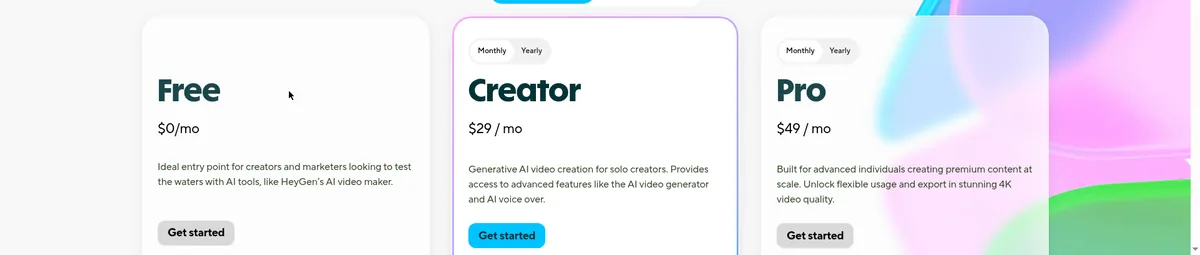
Figures below are from heygen.com/pricing, checked 9 Oct 2026, in USD. HeyGen bills in monthly credits that you spend across features.
| Plan | Price | Credits / allowance | For |
|---|---|---|---|
| Free | $0 | Up to 3 videos/month (1 min max), 500+ avatars, 30+ languages, no card | Testing the workflow |
| Creator | $29/month ($24/month annual) | 600 credits/month | Solo creators, marketers |
| Pro | From $49/month | From 1,000 credits/month (up to 100,000 on higher tiers) | Heavy producers, 4K export |
| Business | $149/month + $20/seat | 1,500 shared credits | Teams, collaboration |
| Enterprise | Custom | Custom | SSO, security review |
Unused credits roll over one month on monthly plans (accumulated on annual). Prices in USD — confirm at checkout.
What credits actually buy
Credit costs vary by model and feature — this is the part to understand before subscribing. Third-party tests put Avatar IV, the most expressive mode, at about 20 credits per minute. Standard avatar video costs less per minute, while premium voices, translation, and 4K export add more. Worked example: on Creator (600 credits/month), roughly 30 minutes of Avatar IV video (600/20) — or considerably more standard avatar minutes. Because costs are feature-dependent, track one real month of your own usage before choosing between Creator and Pro.
The free tier is honest about its limits: 3 videos a month, 1 minute each, 720p max, watermarked. Enough to judge avatar realism and lip-sync — not enough to publish.
What the free plan really gives you
Up to 3 videos per month, each up to 1 minute, 500+ stock avatars, 30+ languages, no credit card required. Exports are watermarked and capped at 720p. It answers “do the avatars look real enough for my use case” — generate the same 60-second script here and on a competitor’s free tier and compare motion and lip-sync yourself.
Your first video in 15 minutes
The workflow that makes HeyGen fast:
- Pick a stock avatar — filter by use case (presenter, casual, professional) and preview 2–3 with your actual topic in mind.
- Paste your script — up to 1 minute on the free tier, up to 30 minutes on paid.
- Choose a voice — or keep the avatar’s default pairing for speed.
- Set aspect ratio — 16:9 for YouTube, 9:16 for Reels/Shorts/TikTok.
- Generate, preview, export — rendering takes a few minutes.
Active working time: under 15 minutes. That speed is the product — compare it with filming, where setup alone takes longer.
Key features (from the official site and docs)
- 700+ stock avatars (500+ on free), 1,000+ voices, 175 languages on paid plans.
- Custom digital twin: build an avatar from your own footage (1 free on paid plans; verification required).
- Video translation with lip-sync across languages.
- Avatar IV: expressive avatar generation (higher credit cost).
- Templates for ads, explainers, and social formats; API on higher tiers.
Feature availability varies by plan — check heygen.com/pricing before buying.
Translation workflow: dubbing with lip-sync
One of HeyGen’s strongest paid features: take an existing video (or a generated one), select target languages — 175 on paid plans — and HeyGen re-renders the speech with lip-sync matched to the new audio. The use case is one ad or explainer shipped to ten markets without re-filming. Translation consumes credits per minute of translated video, and costs are feature-dependent — price a large batch against your credit balance before you start, not after.
The 700-avatar library: how to choose
The library is large enough to cause decision paralysis. A method: filter by your use case, shortlist 3 avatars, and generate the same 30 seconds of your actual script with each. Judge lip-sync on hard consonants (p, b, m), natural eye movement, and whether the avatar’s energy matches your content. Then commit — channel consistency (same avatar every video) matters more than finding the perfect one.
Monthly output per plan
Because credit costs are feature-dependent, here is the honest framing: on Creator (600 credits), budget roughly 25–35 minutes of expressive avatar video a month (at ~20 credits/min for Avatar IV), or more standard minutes. On Pro (from 1,000 credits), roughly double that. If your publishing calendar needs more, price the next tier up before you commit — overage means buying more credits or upgrading mid-cycle.
When to upgrade: Creator vs Pro decision table
- Under ~25 min expressive avatar video/month: Creator $29 — cheapest tier with credit rollover.
- 25–60 min, or need 4K export: Pro from $49 — credit headroom plus 4K.
- Team, shared workspace, seats: Business $149 — collaboration and shared credits.
The Creator-to-Pro jump is about volume and 4K — the core features are the same. Upgrade when you hit the credit ceiling two months running, not on day one.
Avatar realism: what to check on the free tier
Your 3 free videos a month are a test lab. Score each avatar on five things:
- Lip-sync on plosives (p, b, m) — where cheap avatars break first.
- Hand and body motion — most avatars are fairly static; check it suits your format.
- Eye contact drift — does the gaze wander unnaturally?
- Voice-avatar match — does the voice fit the face?
- Background options — clean studio, office, or custom.
Run the same 60-second script on HeyGen and on Synthesia’s free tier and score both. That single head-to-head tells you more than any review — including this one. Full comparison: https://aidealspro.com/heygen-vs-synthesia/
Pros and cons
Pros
- Largest avatar and voice library in the category (700+ avatars, 1,000+ voices).
- Free tier needs no credit card — genuine trial.
- Credits roll over one month (monthly) / accumulate (annual).
- 175 languages on paid plans; lip-sync translation included.
- Fastest script-to-presented-video workflow we have seen.
Cons
- Credit costs vary by model and feature — real monthly cost is hard to predict before you render.
- Free tier is watermarked and capped at 720p, 1-minute videos.
- Premium capabilities cost extra (priority processing, voice cloning are paid add-ons per third-party reports).
- Avatar IV consumes credits fast (~20/min in third-party tests).
- No SCORM/LMS export; not a training platform.
Who should NOT use HeyGen
- Anyone needing cinematic text-to-video — HeyGen generates presenters, not scenes. See our AI video tools hub: https://aidealspro.com/ai-video-tools/
- Training teams needing SCORM export, SSO, and annual minute pools — compare HeyGen vs Synthesia
- Creators who only need occasional videos — the free tier (3/month) may already cover you.
- Anyone expecting exact per-minute pricing upfront — credit costs are feature-dependent.
Digital twin: what the verification involves
Building an avatar from your own footage requires a consent-verification step: you record specific footage following HeyGen’s instructions and submit it; verification confirms the likeness matches you and that you consent. One twin is free on paid plans; additional twins are paid add-ons. Do not skip this — it is the safeguard that keeps the platform (and your likeness) trustworthy.
Export and sharing
Finished videos download as MP4 (resolution by plan: 720p free, 1080p Creator, 4K Pro) or share via link. For teams, shared projects and comments keep review inside HeyGen instead of in email threads. Download masters before any plan change — exports you already made stay yours, but re-exports follow your current plan’s limits.
HeyGen for teams: the Business tier
Business ($149/month + $20/seat, 1,500 shared credits) buys collaboration, not savings: a shared workspace, shared credit pool, and team review. Do the seat math honestly — two solo Creators ($58/month) are cheaper than Business ($189 for two seats); you upgrade for the shared workflow, brand controls, and centralized billing, not the price. Small teams should start as separate Creators and consolidate when sharing becomes painful.
Enterprise (custom pricing) adds SSO and security review for companies where procurement requires it. If your company needs a security questionnaire answered before any tool purchase, start that conversation early — it moves slower than any credit calculation in this review.
Alternatives
Synthesia — for corporate training with minute pools and SCORM (Enterprise): our head-to-head HeyGen vs Synthesia / Higgsfield — for cinematic text-to-video instead of avatars: Higgsfield AI review / Best AI video generators roundup: Best AI video generators
Frequently asked questions
How much does HeyGen cost?
Creator $29/month ($24 annual, 600 credits), Pro from $49/month (from 1,000 credits), Business $149/month + $20/seat (1,500 shared credits), plus a free tier (3 videos/month). Checked on heygen.com/pricing, 9 Oct 2026.
Is HeyGen free?
There is a permanent free tier: up to 3 videos/month, 1 minute each, 500+ avatars, watermarked 720p exports, no credit card. It is for evaluation, not publishing.
How do HeyGen credits work?
Each generation spends credits based on the model and feature — expressive Avatar IV costs about 20 credits/minute in third-party tests; standard modes cost less. Unused credits roll over one month on monthly plans.
Can I use my own face?
Yes — create a custom digital twin from your footage (1 free on paid plans), with a consent-verification step.
Can I use HeyGen videos commercially?
On paid plans, which remove the watermark and grant proper usage rights. The free tier is watermarked and meant for evaluation.
Which is better, HeyGen or Synthesia?
For marketing and creator video: HeyGen. For corporate training at scale: Synthesia. Full comparison: https://aidealspro.com/heygen-vs-synthesia/
What video lengths can HeyGen export?
Up to 1 minute per video on the free tier; up to 30 minutes per video on paid plans.
Does HeyGen watermark paid videos?
No — the watermark is removed on all paid plans. Only the free tier watermarks.
Can I cancel anytime?
Yes — per HeyGen’s pricing FAQ, downgrades and cancellations take effect at the end of the billing cycle.
How long does HeyGen take to generate a video?
A few minutes for typical lengths, depending on queue and features. The help center doesn’t promise exact times — generate during off-peak hours if you’re in a hurry.
Last updated 9 Oct 2026. Prices checked on heygen.com/pricing on that date — confirm at checkout. Category hub: https://aidealspro.com/ai-video-tools/

The AIDealsPro team reads the official pricing and docs for every tool we cover and re-checks prices monthly.
How we reviewKeep reading
Best Free AI Video Generators (2026): Real Free Plans, Honest Limits
The best free AI video generators in 2026 — real free plans only, with every limit listed: watermarks,…
InVideo AI Review (2026): Pricing, Features & Who Should Use It
InVideo AI review 2026: real pricing, prompt-to-video workflow, free plan limits, and who should skip it. Prices via…
Best AI Tools for Faceless YouTube Channels (2026): Full Workflow
The best AI tools for faceless YouTube channels in 2026: script, voice, video, and thumbnail workflow with real…