AIDealsPro is reader-supported. Some links on this page are affiliate links: if you buy through them we may earn a commission at no extra cost to you. It never changes our verdicts. How we review: https://aidealspro.com/how-we-review/
Best for: Higgsfield suits creators who want many video models (Kling 3.0, Veo 3.1, Seedance 2.0, Sora 2) under one subscription; Runway suits editors who want generation plus pro finishing tools in one suite.
Not for: anyone wanting simple flat pricing — both bill in credits with per-model costs.
Starting price: Higgsfield $19/month (270 credits); Runway $15/month (625 credits) — checked 9 Oct 2026.
Table of Contents
Higgsfield’s paid plans start from $9 or $19 a month, depending on the plan set you are shown (checked 10 Oct 2026)
The short answer
Higgsfield and Runway solve different problems. Higgsfield is a model marketplace with one wallet: 50+ video and image models, including frontier third-party ones, behind a single credit balance. Runway is a creative suite: its own Gen models plus real editing tools (inpainting, motion brush, background removal, expand). If your work is “generate clips from prompts across many models,” Higgsfield’s variety wins. If your work is “generate, then edit, composite, and finish,” Runway’s toolset wins. Price per clip favors Higgsfield’s cheaper models; Runway’s flagship Gen-4.5 is the most expensive per second of the two.
What each tool is
Higgsfield
A credit-based platform bundling 50+ models: its own (Soul, Soul ID, Genjutsu, Photodump, Popcorn, Soul Cinema) and third-party (Seedance 2.0, Kling 3.0, Google Veo 3/3.1, Sora 2, Wan 2.6, Pika 2.2, Pixverse V5, Vidu Q2). You buy credits monthly and spend per generation; costs vary by model, length, and resolution (per higgsfield.ai/pricing, checked 9 Oct 2026).
Runway
A creative suite with its own models (Gen-4.5, Gen-4, Aleph 2.0, Act-Two) plus editing tools: inpainting, motion brush, background removal, image expansion, upscaling. Credit-based; Gen-4.5 costs 12 credits per second (per Runway’s published rates via September 2026 reports).
Pricing compared (checked 9 Oct 2026)
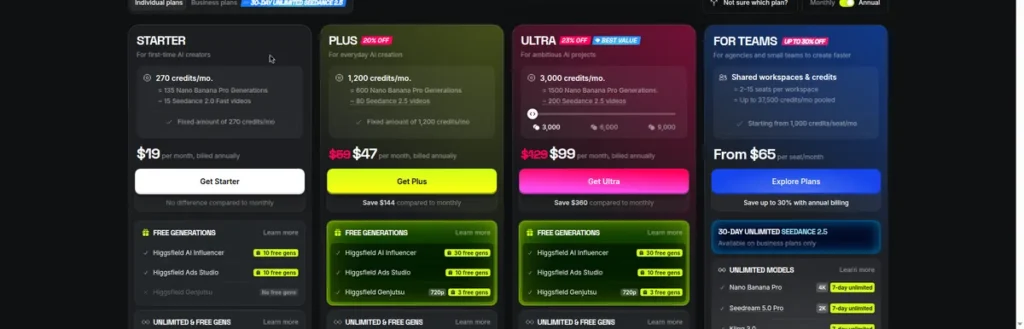
Higgsfield pricing (from higgsfield.ai/pricing, checked 9 Oct 2026)
| Plan | Price | Credits/month | Notes |
|---|---|---|---|
| Free | $0 | Limited use — most models “Not included” | No trial |
| Starter | $19/month (annual same) | 270 | ~38 Kling 3.0 720p 5s clips |
| Plus | $59/month ($47 annual) | 1,200 | ~171 Kling 3.0 720p 5s clips |
| Ultra | $129/month ($99 annual) | 3,000 | Best value tag on site |
Runway pricing (from official pricing page via September 2026 reports)
| Plan | Price | Credits/month | Notes |
|---|---|---|---|
| Free | $0 | 125 one-time (never expire) | Watermarked, limited models |
| Standard | $15/month ($12 annual) | 625 | ~10 Gen-4.5 5s clips; no watermarks |
| Pro | $35/month ($28 annual) | 2,250 | 4K upscaling |
| Max | $95/month ($76 annual) | 9,500 | ProRes, HDR, early model access |

Prices in USD. Higgsfield checked on higgsfield.ai/pricing 9 Oct 2026; Runway per official pricing page via September 2026 reports — confirm at checkout.
Cost per clip: the honest math
Same test — one 5-second 720p clip:
| Clip | Credits | Plan needed | Clips per month on entry plan |
|---|---|---|---|
| Higgsfield — Kling 3.0, 720p | ~7 credits | Starter ($19) | ~38 |
| Higgsfield — Seedance 2.0 Fast, 720p | ~12 credits | Starter ($19) | ~22 |
| Runway — Gen-4.5, 720p | ~60 credits (12/sec) | Standard ($15) | ~10 |
Different models, so this is not apples-to-apples — but it shows the range: Higgsfield’s mid-tier models give you 2–4x more clips per dollar than Runway’s flagship. If you mainly need volume, Higgsfield’s cheaper models win; if you need Runway’s specific look or its editing tools, the premium buys something Higgsfield does not offer.
Monthly output per pl
Same models, full plan ladder — finished minutes per month:
| Plan | Price | Credits/month | 720p 5s clips | Finished minutes |
|---|---|---|---|---|
| Higgsfield Starter | $19 | 270 | ~38 (Kling 3.0) | ~3.2 |
| Higgsfield Plus | $59 | 1,200 | ~171 (Kling 3.0) | ~14.3 |
| Runway Standard | $15 | 625 | ~10 (Gen-4.5) | ~0.9 |
| Runway Pro | $35 | 2,250 | ~37 (Gen-4.5) | ~3.1 |
Higgsfield figures for Kling 3.0 720p (~7 credits/5s); Runway for Gen-4.5 (~60 credits/5s, 12/sec). From higgsfield.ai/pricing (checked 9 Oct 2026) and Runway’s published rates via September 2026 reports.
Read it as: Higgsfield’s $19 entry plan out-produces Runway’s $15 entry plan by ~3.5x in finished minutes — on different models. At $35 vs $59 the minute gap narrows, but the model difference is still the real decision: many models vs one suite.
Feature comparison
| Feature | Higgsfield | Runway |
|---|---|---|
| Model count | 50+ (own + third-party) | Own Gen family + selected integrations |
| Third-party frontier models | Yes (Veo 3.1, Kling 3.0, Seedance 2.0, Sora 2) | Via selected integrations |
| Editing tools (inpaint, motion brush, bg removal) | Limited | Yes — full suite |
| Camera/motion controls | Yes (cinematic controls) | Yes (camera controls) |
| Image generation | Yes (from 0.12 credits) | Yes (Gen-4 Image) |
| Free tier | Limited use, most models excluded | 125 credits one-time |
| API | Console (separate billing) | Yes (separately billed) |
Pros and cons
Higgsfield — pros
- 50+ models under one subscription, including frontier third-party models.
- Cheap per-clip costs on mid-tier models (~7 credits for Kling 3.0 720p).
- Very cheap own-model images (from 0.12 credits).
- Cinematic camera controls.
Higgsfield — cons
- Credit costs vary widely by model — budgeting takes work.
- Pricing tiers changed several times in 2026.
- No free trial; free tier excludes most models.
- No pro editing suite — generation only.
- Credits do not roll over; packs expire in 90 days.
Runway — pros
- Generation plus real editing tools in one place.
- Own top-tier models (Gen-4.5) with consistent quality.
- 125 free credits never expire — genuine trial.
- No watermarks from Standard up.
Runway — cons
- Flagship model is expensive per second (60 credits per 5s on Gen-4.5).
- 125 free credits go fast at flagship rates.
- Credit math punishes experimentation.
- Higher tiers needed for 4K upscaling and ProRes.
Who should choose which
Choose Higgsfield if:
- You want many models without many subscriptions.
- You generate high clip volumes on mid-tier models.
- You need frontier third-party models (Veo, Sora 2, Kling 3.0) in one place.
- Per-clip cost matters more than editing tools.
Choose Runway if:
- You edit as much as you generate (inpainting, compositing, upscaling).
- You want one consistent model family (Gen-4.5) rather than model-hopping.
- You need ProRes/HDR outputs (Max).
- You prefer a suite over a marketplace.
Who should NOT use each
Skip Higgsfield if:
- You need built-in editing — inpainting, compositing, upscaling, and background removal are Runway’s home turf.
- You want one consistent model family rather than choosing between 50+ models every render.
- You only ever use a single third-party model — subscribing to it directly is usually cheaper than the bundle.
Skip Runway if:
- You want frontier third-party models (Veo 3.1, Sora 2, Kling 3.0, Seedance 2.0) without a separate subscription for each.
- Your main metric is clips per dollar — Higgsfield’s mid-tier models produce far more finished minutes per dollar.
- You generate clips and never edit them — you would be paying for a suite you do not use.
The hybrid stack: using both ($34/month)
Some creators run both: Higgsfield Starter ($19) for high-volume generation across models, Runway Standard ($15) for finishing. The workflow: generate 30+ clips on Higgsfield, pick the best 5, and finish them in Runway (upscale to 4K, inpaint flaws, composite). Total: $34/month.
When it justifies itself: hero content where the final 10% of polish matters — ads, portfolio pieces, client work. When it doesn’t: pure volume publishing, where the extra $15 buys finishing tools you never open. Start with one; add the second only when you can name the clips it would have saved.
Start monthly on both — the $34 stack is easy to exit. If after two months you only ever open one of them, cancel the other; the experiment cost you $30–38 and gave you a definitive answer.
The one-paragraph decision
If your main metric is finished minutes per dollar across many models, buy Higgsfield. If your work is generate-then-edit — compositing, clean-up, upscaling — buy Runway. If you publish hero content weekly and can point to finishing work you currently can’t do, run the $34 hybrid stack. Everyone else: pick one, master it, and revisit in six months.
Revisit the decision every six months — model quality moves fast, and the tool that wins today may not win in spring. What doesn’t change: match the tool to the job first, the price second.
Alternatives
For avatar-led video instead of cinematic clips: HeyGen vs Synthesia / For the full category: AI video tools hub / Full reviews: Higgsfield AI review and our best AI video generators roundup: best AI video generators
Frequently asked questions
Which is cheaper, Higgsfield or Runway?
Entry plans: Runway Standard $15/month (625 credits) vs Higgsfield Starter $19/month (270 credits). Per clip, Higgsfield’s mid-tier models are cheaper (~7 credits per 5s Kling 3.0 clip vs ~60 for Runway Gen-4.5) — but they are different models. Compare the models you will actually use.
Which is better for beginners?
Higgsfield’s free tier excludes most models, while Runway’s 125 free credits (never expire) let you genuinely test generation. For learning, Runway’s trial is more useful; for volume after that, compare per-clip costs.
Can I edit videos in Higgsfield?
Higgsfield is generation-first with some cinematic controls; it does not offer Runway-style editing tools (inpainting, motion brush, background removal).
Do credits roll over on either?
No — both reset monthly (Runway Max rolls over up to one month; purchased Runway credits never expire; Higgsfield packs expire in 90 days).
Which should I choose for client work?
Both work on paid plans (no watermarks, proper rights). Choose by workflow: model variety (Higgsfield) vs generate-and-finish suite (Runway).
Can I use both Higgsfield and Runway?
Yes — a common split is Higgsfield for cheap high-volume generation across models, then Runway for finishing the best clips (upscaling, inpainting, compositing). That means two subscriptions, so do it only when the workflow justifies the combined cost.
Which has better image generation?
Higgsfield — dedicated image models from 0.12 credits per image, plus Nano Banana Pro at 2 credits. Runway has Gen-4 Image, but the suite’s strength is video, not stills.
Which is better for ads?
For ad volume — many variants, fast iteration — Higgsfield’s per-clip costs win. For polished hero spots that need compositing, clean-up, and upscaling, Runway’s editing suite wins.
Which has the better free tier?
Runway — 125 credits that never expire, usable on real generation. Higgsfield’s free tier excludes most models, so it teaches the interface but not the output.
Do either offer refunds?
Check the terms at purchase — refund policies change. Monthly billing on both keeps exposure to one month, which is the practical safety net.
Which is better for social media clips?
For volume — daily Reels, Shorts, TikToks — Higgsfield’s per-clip costs win by a wide margin. For the occasional polished piece where compositing and upscaling matter, Runway wins. Most social publishers are in the first camp.
Last updated 9 Oct 2026. Higgsfield prices checked on higgsfield.ai/pricing that date; Runway per official pricing page via September 2026 reports — confirm at checkout.

The AIDealsPro team reads the official pricing and docs for every tool we cover and re-checks prices monthly.
How we reviewKeep reading

Best Free AI Video Generators (2026): Real Free Plans, Honest Limits
The best free AI video generators in 2026 — real free plans only, with every limit listed: watermarks,…

InVideo AI Review (2026): Pricing, Features & Who Should Use It
InVideo AI review 2026: real pricing, prompt-to-video workflow, free plan limits, and who should skip it. Prices via…
Best AI Tools for Faceless YouTube Channels (2026): Full Workflow
The best AI tools for faceless YouTube channels in 2026: script, voice, video, and thumbnail workflow with real…